home.pl: Nr 1 w Polsce. Domeny, Hosting, Serwery WWW, Strony, Sklepy

Pomoc i Baza wiedzy

Przejdź do home.pl >
  • Artykuły
  • Obsługa panelu
  • Obsługa poczty
  • Płatności
  • Dla Biznesu
  • Komunikaty
  • Instrukcje wideo
  • Kontakt
home.pl: Nr 1 w Polsce. Domeny, Hosting, Serwery WWW, Strony, Sklepy

Pomoc i Baza wiedzy

Przejdź do home.pl >
  • Artykuły
  • Obsługa panelu
  • Obsługa poczty
  • Płatności
  • Dla Biznesu
  • Komunikaty
  • Instrukcje wideo
  • Kontakt

English

Wspieramy rozwój firm w internecie

jak się zalogować, jak zmienić hasło, jak opłacić, gdzie faktura, przypisanie domeny.
Centrum pomocy / Wszystkie kategorie / English / How can I check the domain, se ...

How can I check the domain, server and other services expiration date?

Ostatnia aktualizacja: 15 lutego 2021

In the Control Panel you can easily control the expiry date of your services. Remember to regularly check your contact details, especially your email address and mobile number. It is thanks to these means of communication that we can easily inform you about the ending subscription period of your services.

Secure mail? Fast website? Always online? Check our offer: servers, domains, SSL certificates, antivirus software or Office 365. Any questions? 24h/7/365 technical support. We are talking in English.

You can check the service expiration date in two ways:

  • In the service configuration view you can check when your service is paid for
  • In the menu section: Account section> Subscriptions check by when your service is paid

Home.pl before the expiration date will inform you about the possibility of paying for the extension of the service. You will receive a notification in the Control Panel and by e-mail. When you receive the email, simply go to payment by clicking the appropriate link. If you are logged in to the Customer Panel, you can easily check the validity of individual services. In the new Customer Panel, generate payment at any time during the subscription.

Service configuration view

  1. Log in to the home.pl Control Panel. Check how to log in to the Control Panel. How to turn on customer panel in English?
  2. Go to the section: Kreator WWW (Website Builder), Usługi WWW (Hosting services), Domeny (Domains), which is located on the left side of the screen.
    Customer Panel - Go to the section WWW services
  3. A list of services will appear on the screen. Go to the details of the selected service.
  4. After displaying information about the selected service, you will be able to check detailed information about it, e.g. expiry date:
    • Below is an example for the Website Creator service. Wygasa (Expires) – When the service expires.
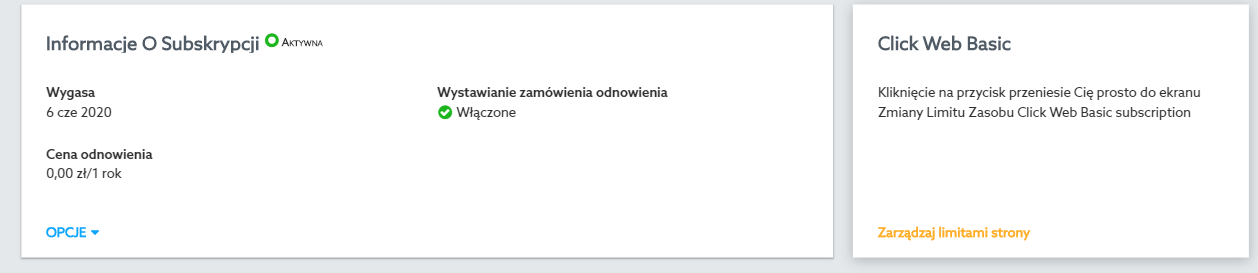
      How do I check the validity of the Web Wizard service?
    • Below is an example for a hosting service. Wygasa za (Expires in) – In how many days the service expires:
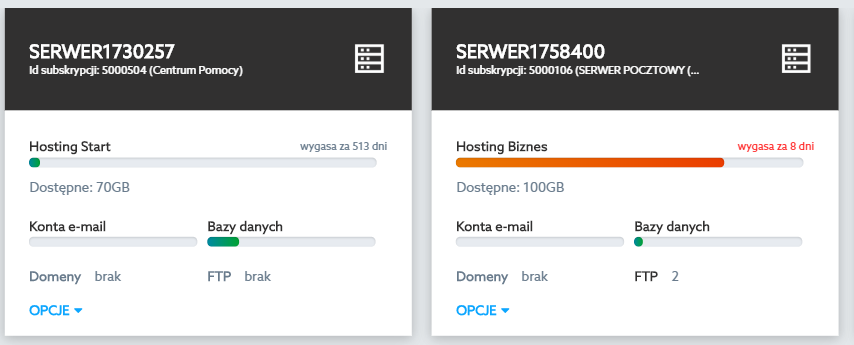
      How to check the validity of the hosting service? View of the service selection panel in the Customer Panel. Information about the validity of the service can be found in the Subscription Information section.

Account section > Subscriptions

  1. Log in to the home.pl Control Panel. Check how to log in to the Control Panel.
  2. Go to the menu section: Konto (Account) > Subskrypcje (Subscriptions). Here you will find information about currently available services, including their activity and expiry date.
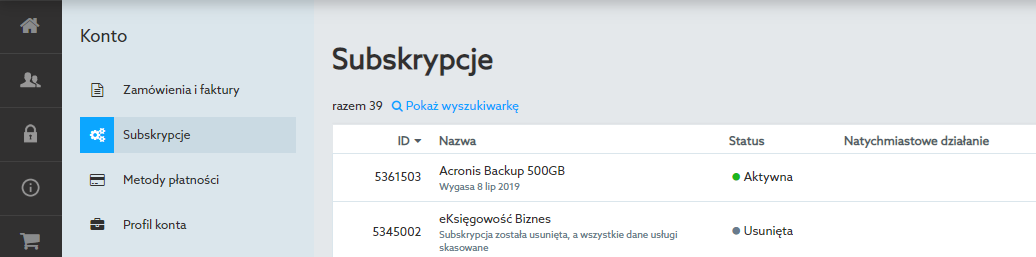
    In the Control Panel you can easily control the expiry date of your services.
  3. Click the selected service to view details about the selected service. On the screen displayed you will be able to perform additional operations, e.g. pay for the next subscription period.
  • Czy artykuł był pomocny ?
  • Tak   Nie

Powiązane artykuły

  • How to create an account and become a home.pl customer?
    Having a customer account at home.pl means having active services, for example: an active domain, an e-mail server or an online store. You can create...
  • How do I install WordPress?
    You can install WordPress using the automatic installation system of the popular CMS. You can find it in the Customer Panel. With one click, you...
  • How to change the password for the SQL database?
    Changing the password to the SQL database allows you to regain access to the database. Remember that changing the SQL database password may require updating...
  • How do I create or edit domain records?
    Domain records allow you to set up „traffic in your domain.” Every time an Internet user opens your website, or when you send or receive...
  • Block anonymous FTP user
    Block access to the FTP server for an anonymous user (applies to the / pub directory) – by checking this option, you block access to...
jak się zalogować, jak zmienić hasło, jak opłacić, gdzie faktura, przypisanie domeny.
lub
sprawdź kategorie pomocy
i wyświetl 2572 wpisów
analityka Anycast autoodbiór AVG backup WWW bazy danych CDN czat etykiety Gmail fanpage firma formularz ftp client Google Sheets Hangouts hurtownie Internet Explorer klucz kaspersky kolumny konto premium kopia zapasowa lista mailingowa microsoft 365 microsoft authenticator Norton Security Online optymalizacja OV Panel klienta PERL photo powiadomienie produkty dnia przelew zagraniczny przesyłka kurierska przypisywanie licencji rejestracja usług rekord TXT serwer do gier strefa domeny system kontroli wersji tabela TLS wizytówka firmy wtyczki wordpress xbox game pass

Kategorie

  • Komunikaty
  • Dla biznesu
  • Rozliczenia i dokumenty

  • Serwery Unix
  • Aplikacje internetowe
    • Media społecznościowe
      • YouTube
      • Facebook
    • Przeglądarki internetowe
    • PayPal
    • CCleaner
  • Rozwiązania serwerowe
    • Serwery VPS
      • VPS Linux
      • VPS Windows
    • Panel Plesk
  • Cyberbezpieczeństwo
  • Strony WWW
    • Kreatory stron WWW
      • eCommerce
      • Moduły
      • Ustawienia
      • Szablony
      • Nawigacja
      • Publikacja i dodatki
      • Szybki start
    • Tworzenie stron WWW
  • Serwery Windows
  • Panel Klienta
    • Logowanie
    • Instalacje i konfiguracje
  • Rejestracja usług
  • Produkty i usługi
    • Spin
    • Zendesk
    • Adobe
    • Usługi Microsoft
      • CodeTwo
      • Microsoft Exchange
      • Windows
      • Microsoft 365 (Office 365
    • Rozrywka
      • Pyszne.pl
      • Spotify
      • Legimi
      • Tinder
      • Nintendo
      • Netflix
      • TIDAL
      • Xbox
      • CDA
    • Narzędzia do pracy zdalnej
      • Teams
      • Zoom
      • AnyDesk
      • TeamViewer
      • SimplySign
    • Programy graficzne
    • Usługi informatyczne
      • Certyfikaty SSL
      • Przywracanie danych
      • Udostępnienie logów oraz analiza błędów
      • Operacje na plikach i bazach danych
      • WordPress
    • Domeny
      • Informacje podstawowe
      • Rejestracja / opłacanie
      • Konfiguracja domen
      • Transfer domen
      • Giełda domen
    • Hosting
      • Hosting PrestaShop
      • Serwer Apache
      • Statystyki serwera
      • .htaccess
      • mod_rewrite
      • Bazy danych
      • Połączenie SSH
      • Hosting dla WordPressa
      • WebFTP
      • Autoinstalator
      • Systemy CMS
        • WordPress
      • Kontrola wersji (SVN
      • Listy mailingowe
    • Bezpieczeństwo
      • VPN
        • AVG Secure VPN
      • Antywirusy
        • AVG
        • ESET
        • Kaspersky
        • AVAST
      • Backup
        • Dropbox
        • Backup WWW
        • Dropsuite Email Backup
        • Acronis Backup
          • Informacje podstawowe
          • Ustawienia dodatkowe
          • Panel użytkownika
          • Panel administratora
      • LastPass
      • Certyfikaty SSL
        • Zamawianie SSL
        • Instalacja i konfiguracja SSL
      • Ochrona WWW
      • SiteLock
    • eKsięgowość
    • Dropbox/Rozwiązania chmurowe
    • AVG PC TuneUp
    • Google Workspace
  • Poczta e-mail
    • Obsługa poczty webmail
    • Programy pocztowe
      • Poczta Windows
      • Poczta MailBird
      • Poczta BlueMail
      • Mozilla Thunderbird
    • Poczta home.pl
  • Rozliczenia i dokumenty
    • Faktury i płatności
    • Zmiana danych (cesja
    • Dokumenty do pobrania
  • Sklep internetowy
    • Shoper
      • Dla deweloperów
      • RODO w sklepie internetowym
      • Promocja sklepu
      • Sprzedaż
      • Pierwsze uruchomienie
      • Asortyment
      • Klienci
      • Integracje
        • Systemy aukcyjne
        • Baza produktów
      • Aplikacje
      • Marketing
      • Modyfikacja wyglądu
      • Raporty i statystyki
      • Płatności PayU
      • Tłumaczenia online
    • Sellastik
      • Domeny
      • Instant Site
        • Szablony
      • Marketing
      • Obsługa zamówień
      • Pierwsze kroki
      • Produkty
      • Promocje i kody rabatowe
      • Wysyłka, dostawa, odbiór
      • Import i eksport
  • Kursy i specyfikacje
    • Kurs HTML
    • Kurs PHP
    • Kurs SQL
  • Reklama internetowa
    • Google
      • Reklama banerowa Google
      • Zakupy Google
      • Google Ads
    • Usługi graficzne
    • Reklama Allegro Ads
    • SEMSTORM
    • Pozycjonowanie
    • rankingCoach
    • Brand24
    • Fresh Mail
  • Program partnerski
    • Program partnerski home.pl
    • Program partnerski Microsoft
  • Dla biznesu
    • Social Media w biznesie
    • Prowadzenie własnej firmy
    • Narzędzia do pracy i edukacji zdalnej
  • English
    • Website Builder
    • Programs
    • Control Panel
    • Webmail
    • FTP
    • Microsoft 365 (Office 365
    • WordPress
    • SSL certificate

Jak ręcznie zainstalować aplikację Moodle w home.pl?

W home.pl najszybszą metodą instalacji aplikacji Moodle jest skorzystanie z Autoinstalatora aplikacji, która pozwala na...

Jakie opcje mogę zmienić po przejściu do konfiguracji Poczty?

Poczta home.pl pozwala na zmianę ustawień dla skrzynki e-mail (np. przekierowanie, powiadamianie, podpis) lub innych...

Co to jest Authinfo?

Authinfo to kod autoryzujący domenę, za pomocą którego można wykonać transfer domeny do innego operatora. Kod Authinfo wydawany...

Społeczność tworzona przez naszych specjalistów i klientów

Chcesz zapytać o nasze usługi? Znasz odpowiedzi na pytania innych? Forum.home.pl to przyjazne miejsce spotkań dla klientów home.pl.

Najnowsze wpisy na forum
pomoc home.pl

Karolina

Wiadomości na skrzynce same przenoszą się do Kosza

pomoc home.pl

devisu

Strona spowodowała zbyt wiele przekierowań

pomoc home.pl

Mikser

Dwie domeny kierujące na jedną stronę WWW

Nie znalazłeś odpowiedzi na swoje pytanie?

Nasze całodobowe Biuro Obsługi Klienta jest do Twojej dyspozycji.

  • Kontakt z BOK

HOME.PL

  • Nasza historia sukcesu
  • Praca w home.pl
  • Biuro Prasowe
  • Data Center
  • Polityka bezpieczeństwa ISO
  • Polityka jakości ISO

PRODUKTY

  • Domena
  • Hosting stron internetowych
  • Poczta e-mail
  • Kreator sklepu internetowego
  • Microsoft Office 365
  • WordPress Hosting
  • Kreator stron WWW
  • Certyfikaty SSL
  • Google Workspace
  • Pozycjonowanie
  • Reklama internetowa
  • Programy antywirusowe
  • Serwery
  • Sklepy internetowe
  • Regulaminy usług

POMOC

  • Dokumentacja i baza wiedzy
  • Forum dyskusyjne
  • Kontakt
  • Komunikaty i aktualności
  • Blog
  • Program partnerski

NASI PARTNERZY

  • CloudBlue
  • Google
  • Mastercard
  • Microsoft
  • Pay U
  • Strona główna
  • Kategorie pomocy
  • Komunikaty
  • Forum dyskusyjne
  • Kontakt