home.pl: Nr 1 w Polsce. Domeny, Hosting, Serwery WWW, Strony, Sklepy

Pomoc i Baza wiedzy

Przejdź do home.pl >
  • Artykuły
  • Obsługa panelu
  • Obsługa poczty
  • Płatności
  • Inspiracje
  • Komunikaty
  • Kontakt
home.pl: Nr 1 w Polsce. Domeny, Hosting, Serwery WWW, Strony, Sklepy

Pomoc i Baza wiedzy

Przejdź do home.pl >
  • Artykuły
  • Obsługa panelu
  • Obsługa poczty
  • Płatności
  • Inspiracje
  • Komunikaty
  • Kontakt

English

home.pl - wspieramy rozwój firm w internecie

Wyświetl więcej wyników...

Generic filters
Exact matches only
Search in title
Search in content

zmiana hasła do pocztyaktywacja certyfikatu SSLprzypisanie domenypołączenie FTPzmiana wersji PHP w .htaccess

Centrum pomocy / Wszystkie kategorie / English / How to create a new user in th ...

How to create a new user in the Control Panel?

Ostatnia aktualizacja: 15 lutego 2021
  • Control Panel
  • Office 365
  • Acronis Backup

You can create further user accounts that will have access to your home.pl Customer Panel. Users you can, among others assign different permissions (user or administrator) and assign to which services the selected user will have access to manage them.

The following configuration also allows you to manage application licenses, such as an Office 365 license or Acronis backup. Granting a license to another user means creating access to your account. Thanks to this solution you control the work of other users and control the resources of your services.

Secure mail? Fast website? Always online? Check our offer: servers, domains, SSL certificates, antivirus software or Office 365. Any questions? 24h/7/365 technical support. We are talking in English.

How to create a new user in the Control Panel?

  1. Log in to the home.pl Control Panel. Check how to log in to the Control Panel. How to turn on customer panel in English?
  2. Go to the section: Users/Użytkownicy, which is located on the left side of the screen.
  3. Here you will find users of your account. By clicking on the username, you can go to its edition, change the password, login, contact details and the number and type of licenses assigned. Add a new user/Dodaj nowych użytkowników.
  4. A form will be displayed on the screen in which basic information about the user’s account being created should be completed.
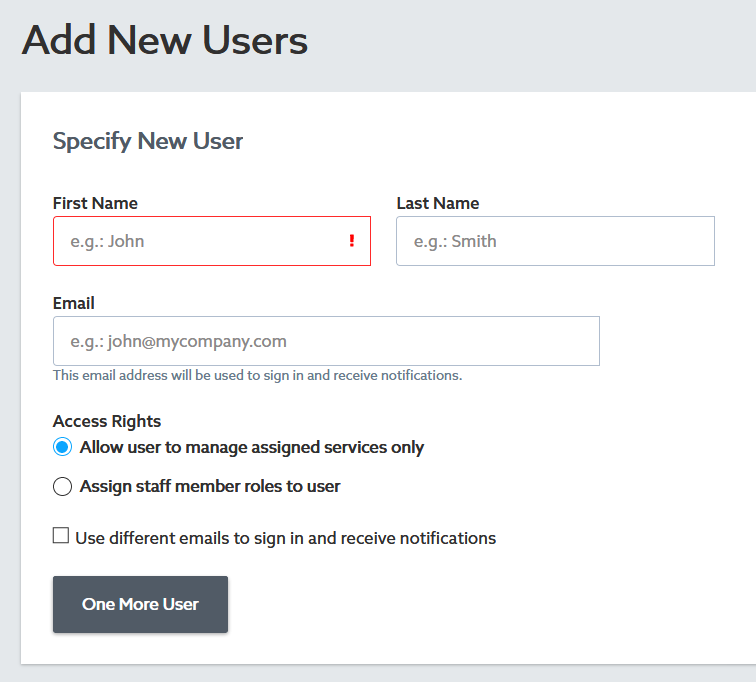
    New User

    • First name/Imię and Last name/Nazwisko – enter the data of the user being created.
    • – select the permissions that the new user would have:
      • Allow user to manage assigned services only.
      • .
    • E-mail address/Adres e-mail – enter the address that will be used as a contact and as a login to the home.pl Control Panel.
      If you want to set a separate e-mail address for the contact and to log in to the Home.pl Customer Panel, select: Use different e-mail addresses to log in and receive notifications/Użyj różnych adresów e-mail do logowania i otrzymywania powiadomień.
    • Click One More User/Kolejny użytkownik if you want to create more than one user in the same process.
  5. At the bottom of the screen, you can select the option that sends an email with an activation link to the users you create.
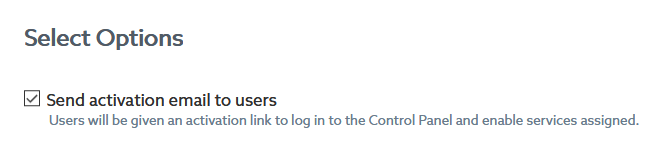
    Select Options
  6. After completing the form for creating a new user, click the Send/Wyślij or Finish/Zakończ button at the bottom of the screen.Finish
  7. After clicking the Finish button, a message confirming the e-mail address will be sent to the contact e-mail address of the new user, which also allows you to set his password to access the Home.pl Customer Panel.
  • Czy artykuł był pomocny ?
  • Tak   Nie

Powiązane artykuły

  • How to change the password for the SQL database?
    Changing the password to the SQL database allows you to regain access to the database. Remember that changing the SQL database password may require updating...
  • How to delegate a domain to another DNS server?
    You have bought a domain at home.pl but you have a mail server and web site with another provider. Use the option to change DNS...
  • How do I create or edit domain records?
    Domain records allow you to set up „traffic in your domain.” Every time an Internet user opens your website, or when you send or receive...
  • What is my server address?
    You can configure various applications to use the server’s resources: programs for operating databases, e-mail, FTP access or CMS management. Depending on the program, you...
  • What are domain records?
    Domain records allow you to set up „traffic in your domain.” Every time an Internet user opens your website, or when you send or receive...

Wyświetl więcej wyników...

Generic filters
Exact matches only
Search in title
Search in content

zmiana hasła do pocztyaktywacja certyfikatu SSLprzypisanie domenypołączenie FTPzmiana wersji PHP w .htaccess

lub
sprawdź kategorie pomocy
i wyświetl 2060 wpisów
adres e-mail aktualizacja android tv Anycast AnyDesk authinfo autoinstalator BDO cesja CRON domeny globalne empik FAQ game pass google shopping instruction Internet Explorer interpreter PHP katalog komunikat konto zewnętrzne kopia zapasowa kurs PHP lastpass Microsoft Defender Microsoft Teams migracja Office 365 panel administracyjny PHP pliki cookies Poczta Gmail Poczta Pro Poczta Windows polecaj powiadomienie pro forma prywatność rekord A SVN szablon szkolenie office 365 WordPress wyciek danych zdalne sterowanie

Kategorie

  • Komunikaty
  • Dla biznesu
  • Rozliczenia i dokumenty

  • Porady i inspiracje
    • Rozrywka
    • Rozwój online
    • Wykorzystanie narzędzi AI
    • Kursy
      • Kurs HTML
      • Kurs PHP
      • Kurs SQL
    • Dla biznesu
      • Prowadzenie własnej firmy
  • Asystenci AI
    • Asystenci AI w firmie
    • Instrukcje
  • Rozwiązania serwerowe
    • Serwery VPS
      • VPS Linux
      • VPS Windows
    • Panel Plesk
  • Cyberbezpieczeństwo
  • Strony WWW
    • Kreator stron od home.pl
      • eCommerce
      • Moduły
      • Ustawienia
      • Szablony
      • Publikacja i dodatki
      • Szybki start
    • Tworzenie stron WWW
  • Giełda domen
  • Certyfikaty SSL
    • Zamawianie SSL
    • Instalacja i konfiguracja SSL
  • Panel Klienta
  • Rejestracja usług
  • Usługi informatyczne
    • Przywracanie danych
    • Udostępnienie logów oraz analiza błędów
    • Operacje na plikach i bazach danych
    • WordPress
  • Programy
    • Pozostałe
      • Zoom
      • Adobe
      • SimplySign
      • Dropbox/Rozwiązania chmurowe
      • AVG PC TuneUp
    • Usługi Microsoft
      • Teams
      • CodeTwo
      • Microsoft Exchange
      • Windows
      • Microsoft 365 (Office 365
    • Czas wolny
      • Spotify
      • Tinder
      • CDA
    • Zdalny dostęp
      • AnyDesk
      • TeamViewer
    • Programy graficzne
    • Bezpieczeństwo
      • VPN
      • Antywirusy
      • Backup
        • Dropbox
        • Backup WWW
        • Dropsuite Email Backup
        • Acronis Backup
      • Ochrona WWW
      • SiteLock
    • eKsięgowość
    • Usługi Google Workspace
  • Poczta e-mail
    • Obsługa poczty webmail
    • Programy pocztowe
    • Poczta home.pl
  • Formalności
    • Kupowanie i przedłużanie usług
    • Faktury i dokumenty
    • Zmiana właściciela (cesja
    • Program partnerski
  • Domeny
    • Informacje podstawowe
    • Rejestracja / opłacanie
    • Konfiguracja domen
    • Transfer domen
  • Hosting
    • Zarządzanie hostingiem
      • Połączenie SSH
      • WebFTP
    • Hosting PrestaShop
    • Serwery Unix
    • Serwer Apache
    • .htaccess
    • mod_rewrite
    • Bazy danych
    • Hosting dla WordPressa
    • Systemy CMS
      • WordPress
  • Sklep internetowy
    • Shoper
    • Sellastik
      • Domeny
      • Instant Site
        • Szablony
      • Marketing
      • Obsługa zamówień
      • Pierwsze kroki
      • Produkty
      • Promocje i kody rabatowe
      • Wysyłka, dostawa, odbiór
      • Import i eksport
  • Reklama internetowa
    • Reklama w Google
      • Google Ads
    • Pozycjonowanie
  • English
    • Control Panel
    • Webmail
    • FTP
    • Microsoft 365 (Office 365
    • WordPress

Jak uruchomić WebFTP w Panelu klienta home.pl?

Poradnik wideo: jak uruchomić WebFTP w Panelu klienta home.pl? Jak połączyć się z serwerem FTP...

System do zarządzania dokumentami sprzedażowymi od Furgonetka.pl

W panelu pluginu Furgonetka.pl możesz w wygodny sposób zarządzać dokumentami sprzedażowymi. W jednym miejscu obsłużysz...

Co to jest strona One Page i Multi Page?

Z artykułu dowiesz się, czym są strony One Page i Multi Page. Przeczytasz również, czym...

Społeczność tworzona przez naszych specjalistów i klientów

Chcesz zapytać o nasze usługi? Znasz odpowiedzi na pytania innych? Forum.home.pl to przyjazne miejsce spotkań dla klientów home.pl.

Najnowsze wpisy na forum
pomoc home.pl

Karolina

Wiadomości na skrzynce same przenoszą się do Kosza

pomoc home.pl

devisu

Strona spowodowała zbyt wiele przekierowań

pomoc home.pl

Mikser

Dwie domeny kierujące na jedną stronę WWW

Nie możesz znaleźć odpowiedzi na swoje pytanie?

Nasze całodobowe Biuro Obsługi Klienta jest do Twojej dyspozycji.

  • Kontakt z BOK

HOME.PL

  • Nasza historia sukcesu
  • Praca w home.pl
  • Biuro Prasowe
  • Data Center
  • Polityka bezpieczeństwa ISO
  • Polityka jakości ISO
  • AI Learn About Us

PRODUKTY

  • Domena
  • Hosting WWW
  • Poczta e-mail
  • Kreator sklepu internetowego
  • Microsoft Office 365
  • Asystent Telefoniczny AI
  • Hosting dla WordPressa
  • Kreator stron internetowych
  • Certyfikaty SSL
  • Google Workspace
  • Programy antywirusowe
  • Serwery
  • Sklepy internetowe
  • Regulaminy usług

POMOC

  • Forum dyskusyjne
  • Kontakt
  • Blog
  • Program partnerski
  • Komunikaty i aktualności

NASI PARTNERZY

  • CloudBlue
  • Google
  • Mastercard
  • Microsoft
  • Pay U
  • Strona główna
  • Kategorie pomocy
  • Komunikaty
  • Forum dyskusyjne
  • Kontakt